
Area of application: Forestry
Bark beetle drone: detecting infested trees early
Finding bark beetles with a drone means identifying suspicious trees early, marking them, and then approaching them directly. The drone flies over the area, the POICloud records each affected tree as a point with its status, and ground workers use the POIApp and our POIApp RTK receiver to locate it with meter-level accuracy. They then confirm on-site whether the beetle is actually infesting the tree.
This way, an overview of the entire area is maintained, even if many trees are affected simultaneously.
This is how it works
From flight to beetle-infested tree in the GIS
- Color image The DJI Matrice 4T or 4E marks the tree with a laser.
- or Multispectral It shows signs of stress in the canopy even without visible discoloration.
-
POICloud
Saves each tree as a POI with its state
- POIApp Foresters arrive and confirm
- GIS Data in QGIS and other systems
color image and laser
Mark beetle-infested trees in color images with a laser.
Using the DJI Matrice 4T or DJI Matrice 4E, you can fly over the tree population in color. If you notice a discolored, thin, or bare crown, aim at the tree. The drone's laser determines its position, and you place the marker directly on the remote control. It immediately appears in the POICloud.
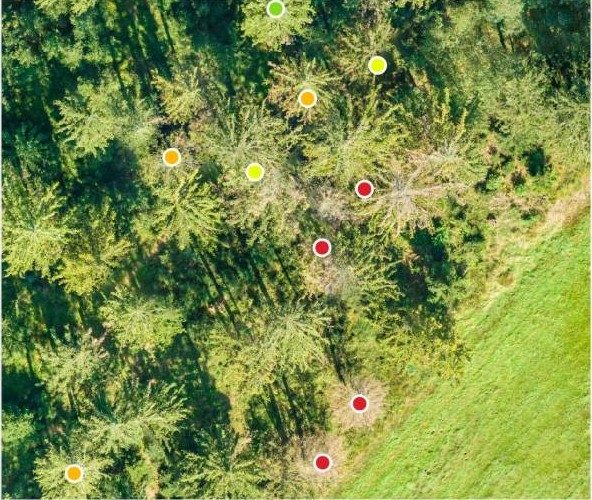
You can categorize the tree's condition into four levels: suspicious, slightly damaged, severely damaged, or dead. This allows you to see at a glance on the map where you need to go first.
POIApp and RTK
Inspect beetle-infested trees and confirm on site
Eure Leute am Boden sehen jeden Punkt in der POIApp auf dem Smartphone und lassen sich hinführen, zu Fuß oder mit dem Auto. Mit einem RTK-Empfänger für die POIApp wird die Position zentimetergenau. Das hilft, wenn in einer dichten Fichtenwand jede Krone gleich aussieht.
Am Baum entscheiden sie, ob sich der Befall bestätigt, und halten im Kommentar fest, was sie gesehen haben, etwa Bohrmehl oder Einbohrlöcher.
- Points appear in real time as soon as they are placed on the drone.
- The app shows who is currently visiting which tree, so that no one visits the same tree twice.
- Change state and leave a comment at the point
- Several teams work on one area simultaneously.
From the deployment
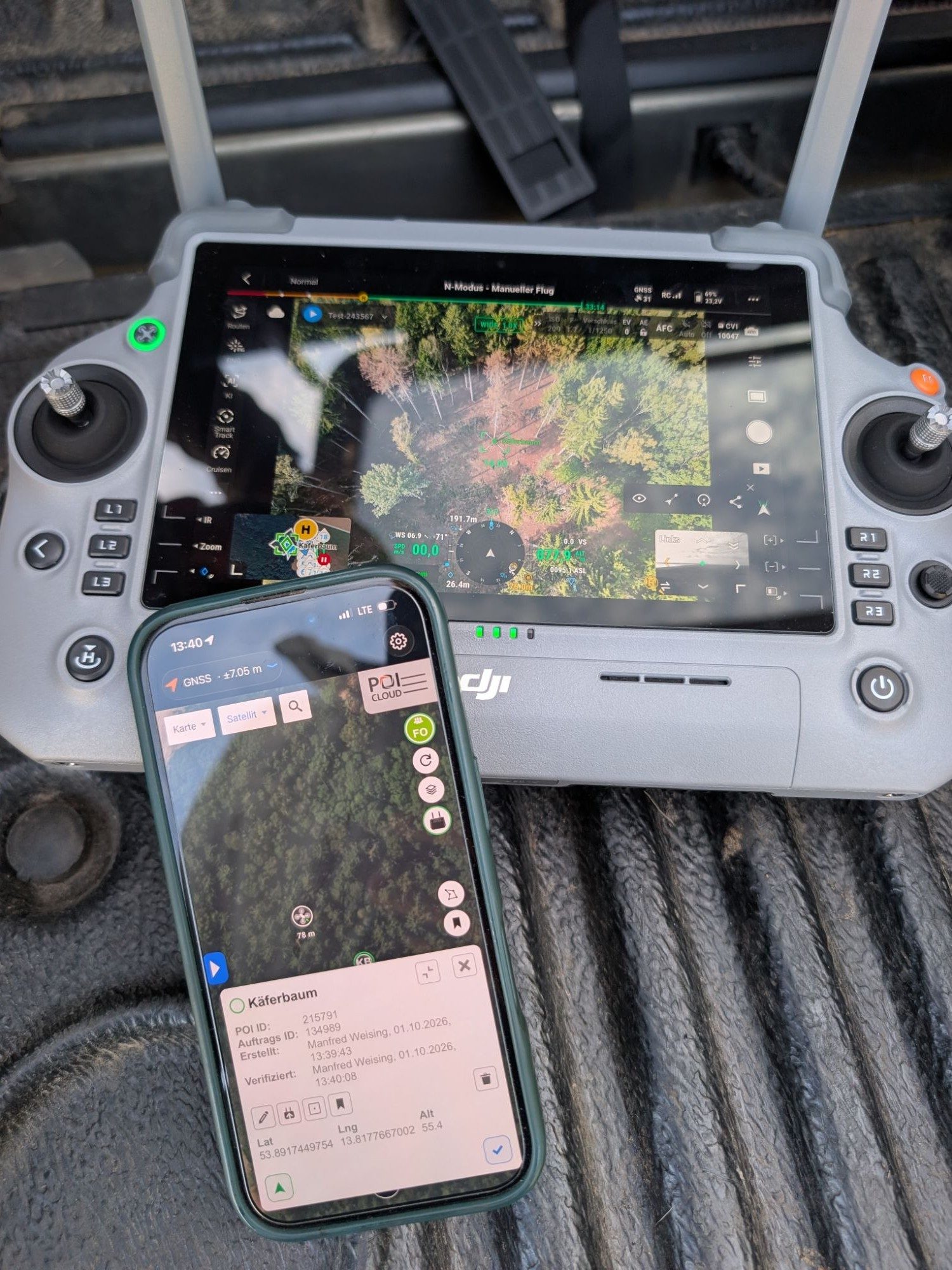
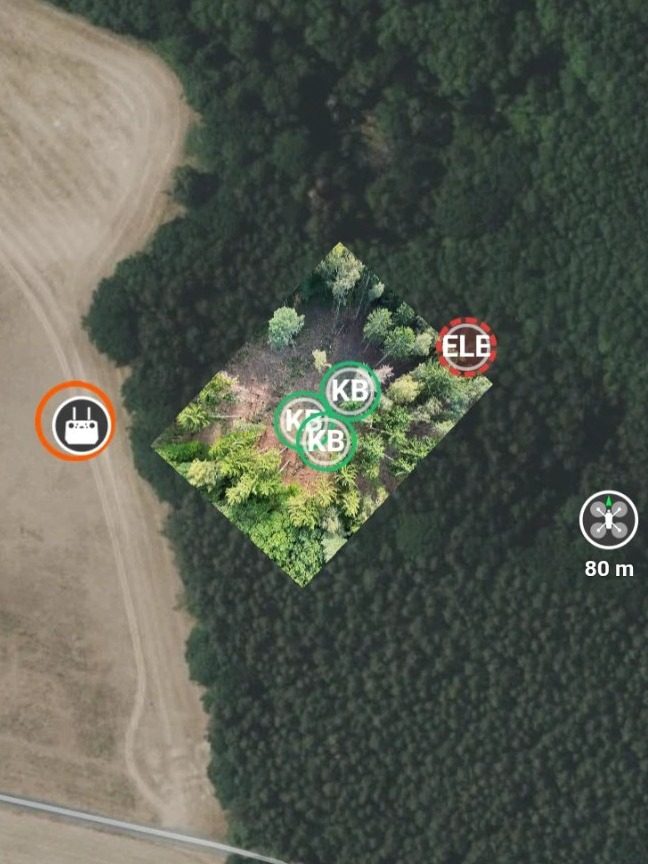
This is what a beetle tree looks like in the POI app.
On the left, the moment in action: The beetle-infested tree is marked on the remote control and appears as a point in the POI app. On the right, the POI app map shows three beetle-infested trees (KB) in a clearing, next to the remote control and the drone. This shows you where you need to go first.
Multispectral analysis
Detecting early damage in the canopy using multispectral imaging
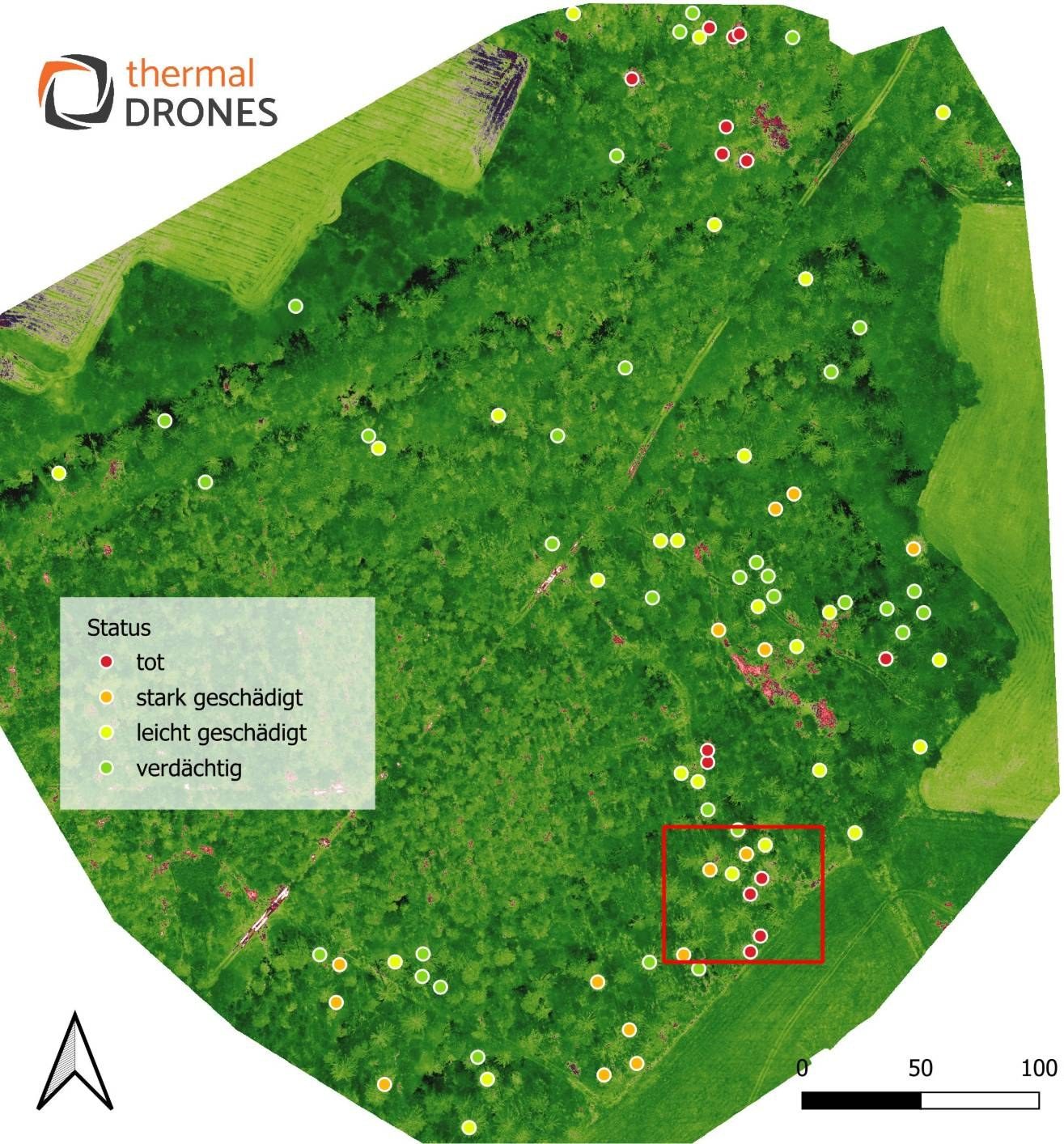
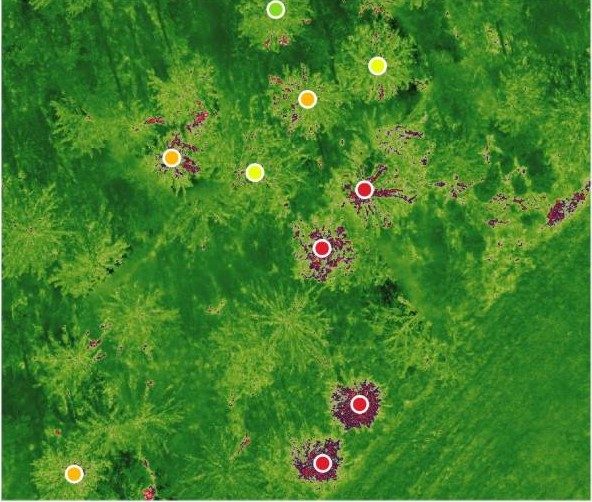
A multispectral camera captures light that your eye cannot see. Stressed trees reflect this light differently than healthy ones, even if the crown still appears green in the color image. In the image, the affected areas glow dark red, precisely around the trees marked as dead or severely damaged.
These are indicators, not a diagnosis: You can confirm whether a tree is infested with bark beetles by examining the trunk.
Planned: automatic evaluation in the POICloud
In the future, multispectral analysis will run automatically in the POICloud. Notable trees will then appear as POIs that you can navigate to directly in the POIApp. Want to be among the first to know? Contact us.
Observe the progress
Suspected cases are re-surveilled by air
Not every suspicion is confirmed on the first flight. Create an area around the suspicious trees, create a task in POICloud, and let the flight plan be generated automatically. On the next flight, you'll see if a tree looks worse and upgrade it from suspicious to slightly damaged, heavily damaged, or dead. If it remains unremarkable, you can withdraw your suspicion.
software
Overview of POIApp and POICloud features
POIApp
-
Share position
RTK pinpoints the exact location of a damaged tree.
-
Share information
All information about the tree is passed on to ground staff and service providers.
-
Document
Status, condition, and implemented measures keep it attached to the tree.
-
lead to the tree
The app guides people on the ground directly to the affected tree.
POICloud
-
planning orders
Create areas and tasks, assign teams and generate flight plans.
-
Creating orthomosaics
The images from the flight create an orthomosaic of the inventory.
-
Analyzing image data
Evaluate color and multispectral images; automatic evaluation is planned.
-
Share data via API
The API will pass data to GIS and other systems; it's coming soon.
GIS integration: determine relevant locations and generate flight orders
-
Findings in the GIS
The free [QGIS plugin from POICloud](/produkte/poicloud/qgis-plugin-api/) retrieves jobs, areas, and POIs with their status directly into QGIS. For other GIS applications, you can export as Shapefile, KML, GPX, or GeoJSON.
-
Places from the GIS
In the GIS, you determine where you need to look, for example, spruce stands near previous infestation sites. You can import externally created areas into the POICloud via "Import fields".
-
generate flight orders
From each area, you create a mission and assign it to a team. The flight plan is generated automatically and, via POIConnect, is sent directly to the remote control.
-
Inform forest owners
For forest owners, authorities or consultants, you set up guest access via link or QR code, with an expiry date and individually activated rights.
Coming soon: API in both directions
The QGIS plugin currently only reads data from the POICloud. The API will enable bidirectional data exchange with your GIS: data on locations out, and data on areas and tasks in. The launch date will be posted under Drone data in QGIS: POICloud plugin and API as soon as it is confirmed.
At a glance
Color image with laser and multispectral in comparison
| feature | Color image with laser | Multispectral |
|---|---|---|
| What you see | Discolored, sparse, or bald crowns | Stress in the canopy, even when the crown is still green |
| For what | Mark conspicuous trees | Identify suspected areas early |
| drone | DJI Matrice 4T or 4E | Multispectral drone, we'll advise you |
| Thereafter | Starting up with POIApp and RTK | Starting up with POIApp and RTK |
| Status | Ready to use immediately | Automatic evaluation planned |
Frequently Asked Questions
Frequently asked questions about bark beetle control with drones
Can the drone see the bark beetle itself?
No. The drone shows the tree's condition: discolored or thinning crowns in the color image, stress in the multispectral image. You check the tree to see if bark beetles are the cause. You then confirm the findings on-site using the POI app.
Which drone do I need for color imaging and laser capabilities?
The DJI Matrice 4T and the DJI Matrice 4E. Which drone is compatible with which software can be found at Which drone is compatible with POICloud?. We offer personal consultations for multispectral analysis.
How accurate is the position of a tree?
With an RTK receiver on your smartphone, you can achieve centimeter-level accuracy. Instructions for setting it up can be found under POIApp RTK Receiver.
How much does it cost to get started?
An account in POICloud and the POIApp are free. POIConnect for drones is a one-time purchase license. Details can be found under Prices and Licenses.
Can I reuse the data in my GIS?
Yes. The free QGIS plugin retrieves orders, areas, and POIs directly into QGIS; you can supply other GIS systems via export. An API for bidirectional data exchange is planned.
Fittingly,
More about POICloud in forestry
-
Drone software
POICloud
Manage areas and tasks, automatically create flight plans and share locations with the team.
More about POICloud -
accuracy
POI app with RTK
Use your smartphone to navigate to the beetle tree with centimeter precision.
POIApp RTK receiver
Advice