
Fawn Rescue: Building the Daily Plan and Assigning Jobs to Teams
Build the daily plan for fawn rescue: assign jobs to teams, keep drives short and give farmers times they can rely on.
Building the daily plan for fawn rescue means assigning jobs to teams, keeping drives short and giving farmers times they can rely on. With POICloud, your dispatch does this the evening before in one place, by hand or from a calculated proposal. The whole operation from field to report is described in Organizing Fawn Rescue with POICloud.
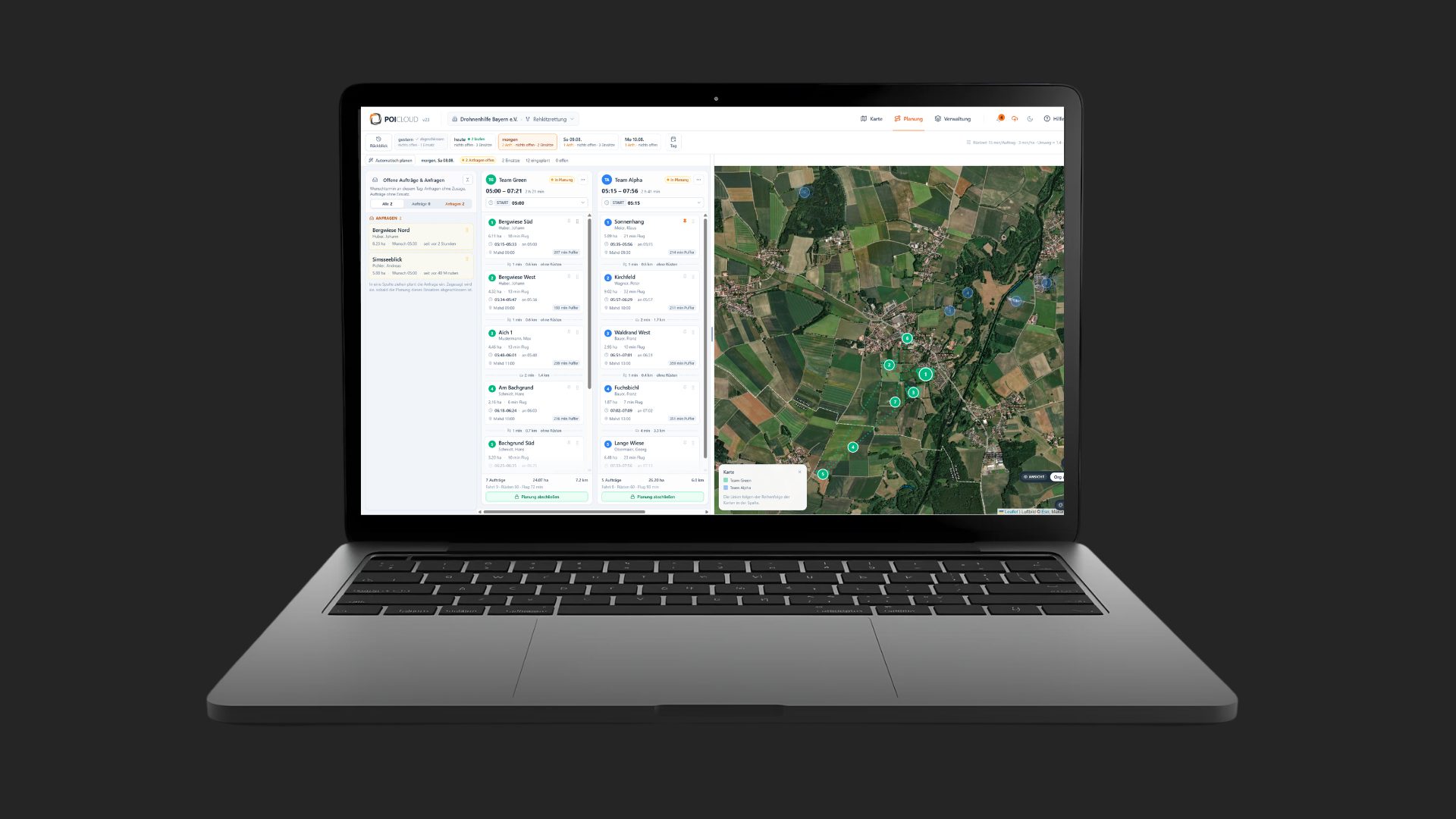
Step 1: Assign jobs to the teams
The evening before, dispatch assigns the jobs to the teams. On the planning board it drags jobs into an operation by drag and drop and picks the operation day at the top, with its counters. Operations can be moved together with their jobs or pinned in place.
Several planners can work at the same time, because you can see who is planning. On a phone, a lock stops a job from being moved by accident.
Step 2: Let POICloud calculate a proposal
If you don't want to assign every job yourself, let POICloud calculate a proposal. Admins choose the teams and a strategy. The result is a daily plan for many fields, which you can still adjust by hand afterwards.
These strategies are available
- distribute evenly: all teams get a similar amount of work
- short drives per team: each team stays in its own area as far as possible
- keep deadlines: the farmers' mowing dates take priority
Step 3: Times farmers can rely on
For every job, POICloud factors in the drive to the field, the setup time and the working time per hectare. The result is a daily plan with times instead of rough estimates. Fields that lie close together can be calculated without new drive and setup time.
The advanced routing service (beta) also works with a vehicle profile and can avoid certain road types. That helps when you travel in an off-road vehicle rather than a car.
Step 4: The schedule goes to the phone
Every team sees its operation as a schedule in the sidebar: with a timeline for done, running and waiting, with times, areas and notes such as “Caution, hilly”. Farmers can also see the schedule of the operation.
If you prefer something on paper, print the operation plan as a PDF for the vehicle or forward it. You choose the overview map, the course of the day and a detail map per job.
Frequently asked questions
Frequently asked questions about the daily plan
Can several people plan at the same time?
Yes. On the planning board you see who is planning, so nobody gets in anyone's way.
Do we have to accept POICloud's proposal?
No. You can keep moving or pinning jobs and whole operations by hand, even after POICloud has calculated a proposal.
Who sees the plan?
Teams see their schedule on their phones and can print it as a PDF. Farmers can also see the schedule of the operation.
Read on
Before and after the plan
How the jobs reach you is covered in Fawn Rescue: Accepting Jobs Online. How flight routes and altitudes fit the plan is explained in the flight parameters for fawn rescue. Every step is described in detail in the POICloud documentation.
Demo