
For authorities and associations
Drones for authorities and associations: areas, verification and interfaces
Whether it's a water and soil association, a nature conservation authority, or a professional organization: anyone using drones needs to plan areas, document results, and integrate data into existing systems. thermal DRONES' POICloud manages your team's areas and tasks, records what was flown and found, and shares the data as a file or via a QGIS plugin. All this is done in a browser, without any installation on your workstation.
Those who use POICloud
Drones for water and soil associations, nature conservation and professional associations
-
Water and soil associations
Areas within the association's territory
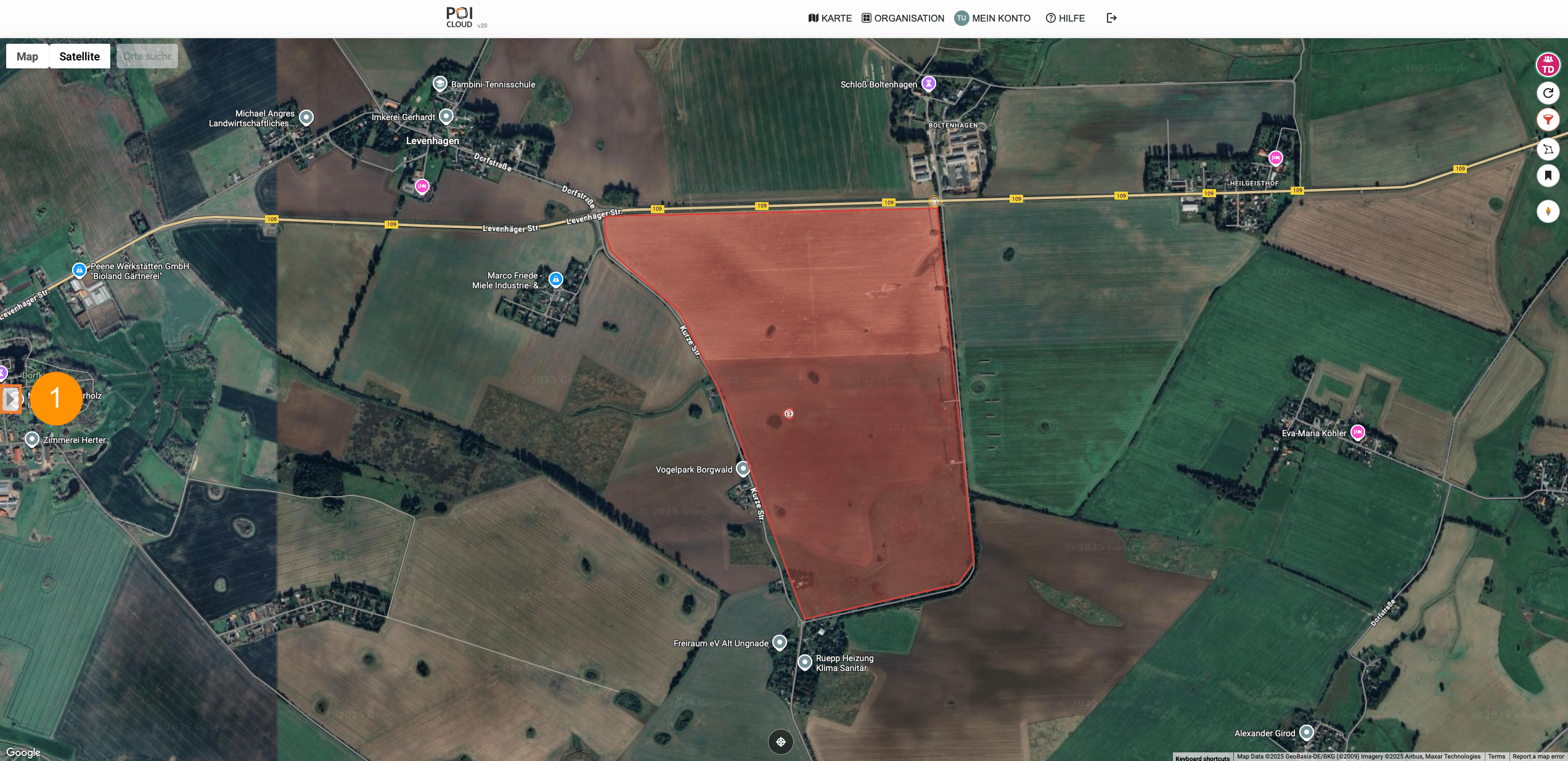
You draw areas as polygons or import them, create tasks from them, and assign them to a team. The map shows you at any time what is open and what is completed.
Surveying and mapping with drones -
Nature conservation
Nature conservation authorities and species protection
Share thermal images and locations within the team, confirm sightings, and the sighting statistics are generated automatically. This approach, used in breeding bird and species conservation, can be applied to your tasks.
Bird and species conservation using drones -
Hunting and agriculture
Associations and clubs
District hunting associations, hunting districts, farmers' associations and fawn rescue organizations are organizing many areas and volunteers. Clients register their areas themselves via an invitation link (Beta).
Organize fawn rescue
What authorities and associations expect from drone software
-
Proof
Incident reports are sent as PDFs from the POICloud. Each area displays its status: blue (no assignment), red (active assignment), green (completed). Locations and statistics are retained within the assignment.
-
Access and roles
Administrator, member, and guest roles determine who can see what. Clients or consultants receive guest access via a link or QR code, with an expiration date and individually granted permissions.
-
interfaces
You can export locations and fields as shapefiles, KML, GPX, GeoJSON, or ISO XML. The free QGIS plugin imports jobs, fields, and POIs directly into QGIS. An API for connecting your own systems is coming soon.
-
Airspace in focus
You overlay geozones from the Digital Platform Unmanned Aviation (dipul), official aerial images and obstacles such as wind turbines or power lines onto the map before takeoff.
Plan
Organize the association's territory into areas and tasks
You draw areas on your PC or smartphone, or import them from existing data. Each area creates a mission, which you assign to a team. POICloud automatically generates the flight plans, optionally as a terrain flight plan with a high-resolution terrain model, and sends them directly to the remote control via POIConnect.
This is how flight data gets into your systems
- POIConnect Locations and live image directly from the remote control
- or POIStudio Evaluate thermal images on the PC after the flight
-
POICloud
Saves areas, missions, and locations of your team
in Echtzeit
- QGIS Orders, fields and POIs as a GeoPackage
- browser Management and guests can see the stand and live video.
- report Incident report as PDF, data as file
Frequently Asked Questions
Frequently asked questions from authorities and associations
Can water and soil associations use the POICloud?
Yes, POICloud manages areas, missions, flight plans, and locations regardless of the application. Specific categories include templates for flight parameters and location classification; we welcome suggestions for additional categories. Let us know what you'd like to fly in your association's area.
What evidence does POICloud provide?
Incident reports as PDFs, the status of each area on the map, and statistics on confirmed finds. Find locations and fields can also be exported as a file.
How does the data get into our GIS?
Via the free QGIS plugin from POICloud or by exporting as Shapefile, KML, GPX, GeoJSON or ISO XML. An API for custom systems is coming soon.
Can clients or consultants view the content without having an account?
Yes. You issue guest access, as a link or QR code, with an expiry date and individually activated rights.
How much does POICloud cost for an association?
An account and the POIApp are free. POIConnect for the drone and POIStudio for PC analysis are purchased as a one-time license. Prices are listed under Prices and Licenses.
Are we allowed to fly everywhere?
No. Geofencing and protected areas set boundaries; POICloud displays dipul's geofencing on the map before takeoff. Legal information can be found under Drone Law and No-Flight Zones.
Fittingly,
More for authorities and associations
-
Fire brigade and disaster relief
Live image, thermal image and drone location for incident command, staff and control center.
Drone software for emergency services -
Surveying and mapping
Survey areas from the air and transfer results to the GIS.
Surveying with a drone
Advice